Consent collection requirements
Before using any of our services, you are required to read, understand, and agree to these terms. You can also download this document below.
View as PDFDefinitions
- Application Owner – Application owner is the entity (organization) responsible for the lifecycle management, acceptance, and onboarding of an application.
- Consent - Consent is a regulatory privacy aspect. Subject to applicable laws, such as GDPR, consent is required from user for processing personal data from the network. It is the permission given by a user to an identified party allowing to process (a selection of) this user’s personal data for a well-identified scope (set of actions) and purpose.
- Data owner – Data owner is Telecom Operator’s subscriber whose privacy data is processed using network APIs.
- NaC – Nokia's Network as code platform
- Operator - A telecom operator that exposes its internal network functionalities and data to external application owners and enterprises through a standardized set of APIs.
- User or Subscriber - The user is the owner of a device using a mobile subscription. The user is also a subscriber.
Purpose
In some countries, Operators want to delegate the responsibility of user consent collection to trusted Application Owners.
This document is only applicable for scenarios where Operators have delegated the responsibility of collecting user consents for consuming Network APIs to Application Owners. The current document is also applicable to countries outside EU GDPR where consent collection responsibility is delegated to Application Owners.
In support of delegated consent collection, Nokia “Network as Code” enforces related requirements to Application owners via its Terms & Conditions. Application Owners need to share their user consent collection implementation screenshot to the Nokia Network as Code platform during application onboarding. Then, the Nokia Network as Code platform will share this screenshot as evidence with the Operators involved. The Operators verify that the Application will collect user consent before they approve the API subscription(s) for this Application.
This ensures compliance with:
- Country privacy regulations such as GDPR (General Data Protection Regulation)
- Telecom regulatory requirements
- Operator policies
- Privacy-by-design principles
- Audit and compliance requirements.
EU GDPR has defined following legal basis for processing personal data as stated in Article 6(1) GDPR.
- Contract
- Legal obligations
- Vital interests of the data subject
- Public interest
- Legitimate interest
- Consent
This document is only applicable if the legal basis of personal data processing activity is “Consent”. If there is a legal basis other than “Consent” then the current document is not applicable.
Application owner remains liable for ensuring consent collection for delegated consent approach, and they must abide by their local regulation and laws.
Consent screen design requirements
Application owners are free to choose the theme as per their application design; however, they must show consent screen to end users whenever consent is required for using API:
- Consent language must match the application language. For example, application language is German than consent screen must be in German. If application language is English, then consent screen must be in English.
- Application name or logo must be visible on the consent screen.
- Scope must be clearly visible in user understandable format. For example, “Application is trying to access the location of your device” can be shown for location verification.
- Consent screen must show clear Purpose to end user.
- Privacy policy URL of the application must be part of the consent. This URL must also host where user can reach to practice data subject rights such as revoke, modify etc.
Below is an example of application screen for capturing consent:
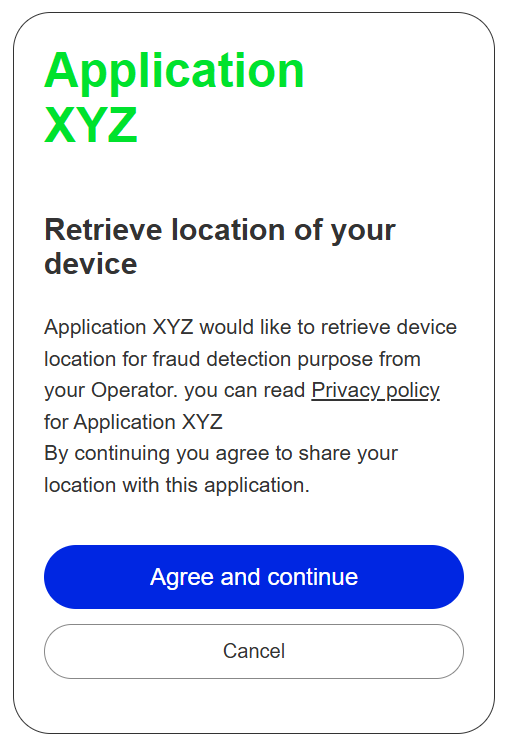
In above screen,
- Application XYZ is the name of the application.
- “Retrieve location of your device” is the scope of the API.
- “Fraud detection” is the purpose.
- Privacy policy should be a hyperlink of the application’s privacy policy.
Mandatory Consent Screen in Germany for using number verify API
The application login screen must include the text below to obtain the user's consent before any IP matching / processing based on the phone number can be done.
The user must be able to see this screen every time they login to an application that uses the number verify API.
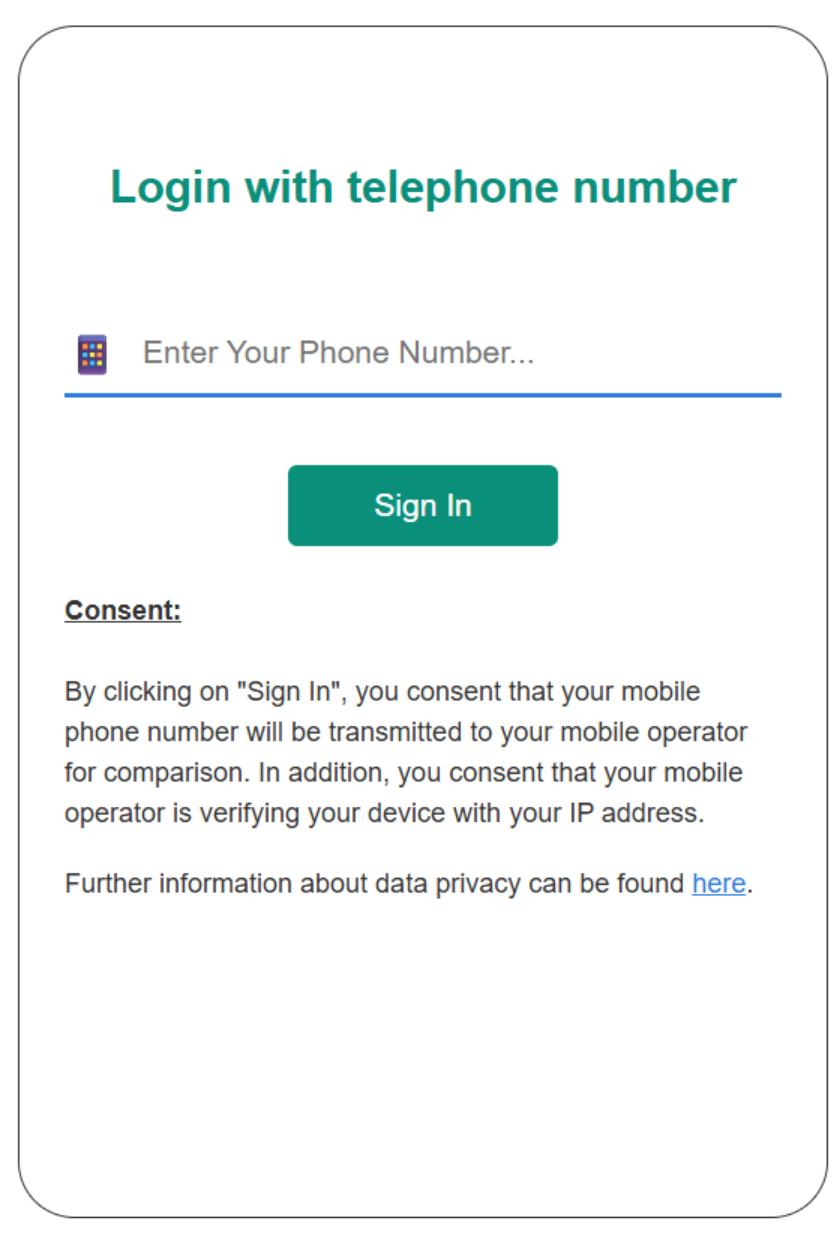
This is the mandatory text in English that needs to be displayed (as-is) on the application’s login screen:
“By clicking on [Button], you consent that your mobile phone number will be transmitted to your mobile operator for comparison. In addition, you consent that your mobile operator is verifying your device with your IP address. Further information about data privacy can be found here.”
If language of the application is German, then following consent text must be shown in German language:
“Beim Klick auf [Button] sind Sie damit einverstanden dass Ihre Mobil funknummer an Ihren Mobil funkanbieter für einen Abgleich übermittelt wird. Ferner sind Sie damit einverstanden dass Ihr Mobil funkanbieter Ihr Gerät zusätzlich mit Ihrer IP-Adresse verifiziert. Entsprechende Datenschutzhinweise finden Sie hier:”
The link in the text must be https://www.numberverify.org/privacy-policy.
[Button] must be replaced by the name of the actual button. For example: sign in.
Below is an example of application screen for capturing consent:
Mandatory Consent Screen in France, Portugal and Spain for using number verify API
The application login screen must include the text below to obtain the user's consent before any IP matching / processing based on the phone number can be done.
The user must be able to see this screen every time they login to an application that uses the number verify API.
This is the mandatory text in English that needs to be displayed (as-is) on the application’s login screen:
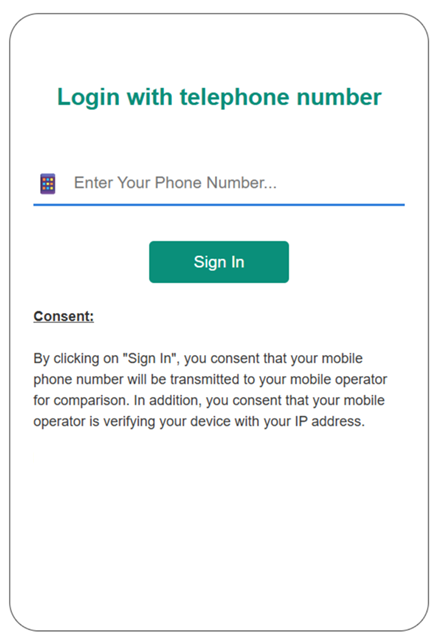
“By clicking on [Button], you consent that your mobile phone number will be transmitted to your mobile operator for comparison. In addition, you consent that your mobile operator is verifying your device with your IP address.”
Consent language must match the application language. For example, application language is French than consent screen must be in French.
[Button] must be replaced by the name of the actual button. For example: sign in.
Below is an example of application screen for capturing consent:
Consent collection requirement for using number verify API in US
The application login screen must include the text below to obtain the user's consent before any IP matching / processing based on the phone number can be done.
The user must be able to see this screen first time they login to an application that uses the number verify API.
This is the mandatory text in English that needs to be displayed (as-is) on the application’s login screen:
“By clicking on [Button], you consent that your mobile phone number will be transmitted to your mobile operator for fraud prevention purpose. In addition, you consent that your mobile operator is verifying your device with your IP address. Further information about data privacy can be found on our [privacy page]. Your consent will be recorded and retained in accordance with our privacy practices. You will not be asked to provide this consent again unless required by applicable law or if the purpose of processing changes. You may withdraw your consent at any time by contacting us through the privacy support channels <<privacy support email or page of application>>.”
[Button] must be replaced by the name of the actual button. For example: sign in.
[privacy page] must be replaced by actual privacy policy URL of the application.
This consent must be recorded and stored by the application as per regulatory requirements. Consent records must be encrypted at rest, encrypted in transit, access-controlled, audit logged. Consent records must be presented to the Operator or regulator in case of any audit or legal requirement.
Last updated August 19, 2026